Can somebody please just make a NUC-type device that I can purchase as a unit with the following included:
  Rasberry PI 8GB + WiFi + Bluetooth
  NVMe >= 128gb
  Power supply appropriate for PI+NVMe (3.5A perhaps?)
  Case with appropriate cooling
  Ubuntu >= 20.04
I would pay up to $200 USD for such a product. Why not an intel NUC? Because I want to leave this on 24/7 and run various cron jobs etc, so I want the low-power ARM chip.
Yes I can build it myself, but shopping for, gathering all the parts etc is time consuming and I'd rather be writing my apps etc to run on the device instead...
I've never been very moved by the pi line for "non-maker" "server-type" stuff.
Personally, I run a 4GB RockPro64 [0] in the NAS case [1].
Add a heatsink [2] and a beefier 5A power supply [3] just in case I ever want to add spinning drives. But for now I just use an NVMe adapter [4].
That's $148 total.
For $15 you can add Bluetooth and Wifi [5] if you really want. Instead I chose to treat myself to $21-$40 worth of eMMC5 storage for the OS [6].
> I've never been very moved by the pi line for "non-maker" "server-type" stuff.
I love raspberry pis but pi-mania is absolutely out of control. I can't count how many $100+ programmer hours I have seen wasted waiting for a $10 pi to boot, build, or generally stop being slow. I have witnessed the deep shame of a multi-million dollar exhibition center-featuring a RPi kiosk deployed in front of customers that chugs so hard the sales team takes shifts intercepting people before they can poke at it and realize how much of a dog it is. But at least they saved $200 on not using a laptop, right?
If you want to dip your toes in the hardware world from the comfort of ubuntu at impulse buy prices, pis are great, but they stop making sense very quickly once you exit that specialized vertical.
Phoronix did a reasonable comparison of an Rpi4 to a Celeron G5900 and it does a pretty good job of showing why a Pi isn't a great (even low end) general purpose option. Not disputing it's usefulness in other spaces...
The only interesting thing about that comparison is that the Pi did pretty well in the single real-world software benchmark Phoronix did (something to do with LibreOffice and pdfs), where it was 59% the speed of the Celeron G5900, and it managed that with an SD card rather than proper USB 3 storage.
"It's not as fast as a new Intel processor" is not new information...
I’m guilty of this. I use Pis for industrial use monitoring some machinery’s serial output and being a server for it. I know the SD cards will eventually get corrupted from power cycling and I’ll have to come fix them. But the alternative is buying a bunch of $250-500 industrial arm computers sight unseen, with a tiny fraction of the support and reviews that Pis have so it feels like a shot in the dark.
The MLC and SLC cards for industrial use are not that bad. Regular sd cards TLC will break quicker. I use pi's for exhibitions at work, with great success for a few years, as well as for digital signage screens.
I think ARM is cool and have a few SBCs around for various projects, but... for ~$150, you can get an entire (used) PC, with a Skylake i5 and 8GB of RAM (in addition to the case, power supply, etc). There's just so much more you can do with that, so unless you need ARM, there isnt a lot of point. Even with expensive electricity, the Pi will save you maybe $1/month.
Example eBay listing: https://www.ebay.com/itm/DELL-OPTIPLEX-7040-SFF-DESKTOP-INTE... (no storage drive on this, but it has NVME, so for $50 you can add more storage than many use cases need, and it'll be much faster and more durable than SBC eMMC or SD solutions).
Yep I recently picked up a used slim HP EliteDesk 800 G1 SFF i5-4590 Quad Core 3.3GHz 16GB RAM / 240GB SSD With Win 10 Pro for $150..
And it literally was in lightly used (basically perfect) shape and no issues at all.. they even threw in a cheap WiFi dongle.
It’s amazing what you can get on eBay for value as far a large used computers go.. obviously it’s YMMV as far as the seller you happen to buy from and the condition of the item you receive.. but for me, this machine was super awesome and fast (I hadn’t bought or built a desktop PC in at least 10 years prior to this)...
4 x64 AMD Puma cores at 1.5GHz, dual-channel DDR3 4GB SODIMM (1600MT/s), 16GiB m.2 storage, mPCIe, gigabit ethernet, 6x USB 2.0, 2x USB 3.0. 7W in idle and it's fast enough to run Gentoo. I paid 25 EUR for it. You can expand RAM (up to 16GiB) and storage if you wish for a little bit more.
PC recycling companies buy these by weight and there is very little in terms of secondary market. Most of these end up in landfills, while being perfectly capable little home servers.
I still use a NUC5i3RYH every day. It has been remarkably stable, haven't had to replace a single part or have any issues since building it in 2015, and makes an outstanding Hackintosh to boot.
Either I got lucky with the two I own, or your environment was to harsh for them?
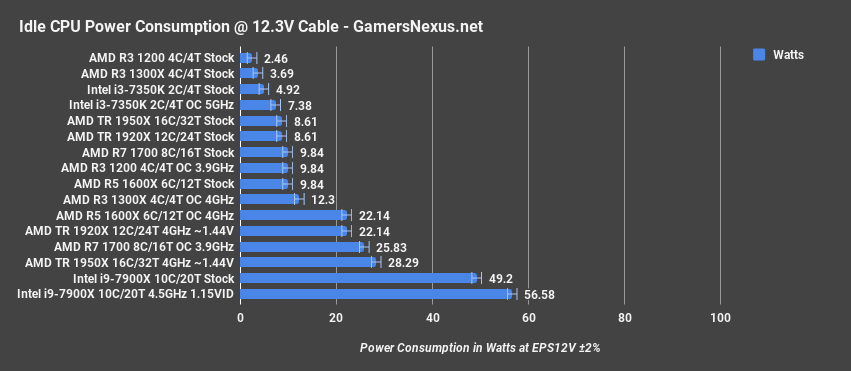
Hmm that's really really surprising if thats the case. According to the spec sheet [1], its TDP is 95W. RAM itself is 3W each, the cooling fans is easily 5W, the CPU cooling fan should be another 10W-20W. Would love to learn the configuration that gives you 20W power usage total. To put into perspective, my mac M1 uses 20Wish normally for regular usage.
I just got a "1 Liter Form Factor" HP DeskPro 405 G6 Mini that measures about 175x175x35mm (7x7x1.4 inches). AMD Ryzen 7 4750GE PRO (Zen 2) that has a base 3.1GHz clock for eight cores (4.3GHz all boost) which is an APU with eight Radeon GPU cores, in which I DIY added in 64GB of memory, and a 1TB Samsung 980 Pro.
With the Intel AX200 WiFi 6 and BT 5.0 disabled, it idles at barely 12W. Running a bunch of virtualized loads (nothing crazy) in XCP-NG, it's consistently under 20W despite no matter what's running on it. If I had it going flat out (with a 5GbE NIC plugged in via USB Type-C) under something like heavy video rendering (CPU+GPU+storage) loads it peaks at about 48-50W.
We're entering an era of pretty fantastic power consumption, especially if you shy further away from Intel SKUs at the moment. The Intel SKUs are pretty frugal, but the AMD ones genuinely sip power and are only getting better.
TDP is worst case sustained heat output for selecting heatsinks, not representative of typical consumption at all. Typical CPU fans are also like 12V/0.25A max with power variable between 50 to 100% or so. 20W idle is thus very believable for a build by a sane person[2].
2: Personally I often end up with more substantial configurations like 12V/1.5A 80mm with couple 12V/1A as sides but my suspicion is my lack of sanity is a huge contributor to that
"It’s easy to see why Intel hasn’t changed the way it defines or communicates TDP to its customers: It would make the company’s high end look vastly worse compared with AMD. A Core i9-10850K will draw up to 265W. If you want an AMD CPU with that kind of power budget you have to buy a Threadripper."
Intel's TDP is more based on the max the CPU would draw, when all the various Turbo modes are disabled. Which reflects approximately zero real-world deployments except for the very low-end parts where Intel disables the Turbo modes for product segmentation.
In the video linked below at 6:55 he says the PI can consume up to 10 watts at peak. Referencing the Raspberry pi documentation^1 it says that the PI 4 consumes 600mA of power at typical bare board consumption. Looking at intel Ark^2 for a i5 sandy bridge shows a TDP of 95W. So it has the capability of pulling far more watts. Sure the Intel computer is much more powerful than the PI 4, but just as your computer is only using 20 watts of power in a NAS setting, the pi will probably be pulling far less than 10watts, especially when idling. So while not the lowest power you can get, still an incredible amount ratio for performance to power. I suspect that for a pi4 running 24/7 with cron jobs, the wattage will be far lower than what an older intel CPU would pull, but this is just a theory, I'd have to have the parts myself to test it out
its worth noting raspberry pis have no real power management too. i mean the cpu governors can down clock saving bulk of energy, but you cannot turn off cores
Or quite a few Chromeboxes can be wiped and run Linux (though it's worth doing a little homework, some at least need to be popped open to have their dev-mode screw pulled like this[1]). Certainly options for less than $100 on eBay.
Intel NUCs are IMHO exceptionally nice and fit your requirements, with some little caveats. Besides, it's a much more powerful machine and it will be easier to run till ARM becomes more popular. With some tweaks, in my experience it can use 3-4 W, so it might be able to replace a Pi in some scenarios.
You might go slightly over budget with an i3 (unless you shop for a deal). You need to install a NVMe yourself, as well as RAM. The i3 can be run in a silent mode, but there are some third party cases around which let you go fanless. I don't understand why Intel is not selling a fanless NUC with an i3 / m3. There's a lot of potential. Same for AMD.
I'll tack on one more wish, if we're building a NUC-like: Ship with an SD card in it that contains only the Pi boot blobs and a build of the edk2 firmware so that the system boots to UEFI and then acts like a normal computer that can boot standard OS images and not need special images with the Pi's insane boot sequence programmed into them.
My Asus PN50 w/R7-4800U gets me 8C/16T for 10W, NVME SSD and SATA SSD - no noise most of the time, very faint fan noise under load. Even suspends / resumes well under Linux - coupled with Wake on Lan - it's close to Pi level power usage and acoustics.
You can get a 4C one for $329 w/o memory and disks - not cheap but I was merely trying to point out that x86 can do low power with great performance now a days.
The joke with the Raspberry Pi is that it is 1) so cheap because its manufactured on an old silicon node but of course that implies 2) it actually uses a ton of power compared to a chip made in 7nm.
From what I could find the RPi chips are made in 27nm, and while you can't exactly linearly extrapolate from that, I wouldn't be surprised to find that a 7nm smartphone chip can get you the same performance as the RPi at 1/3rd the power consumption.
Just get a low-end intel box that is not a nuc. It doesn't have to be a nuc, try one of the zotac fanless machines, which is low power because of thermals.
I think once AMD spools up with 7nm we'll have machines like this with even lower power.
For a similar use case I ended up with a Lenovo "nano" desktop. The IoT models are designed to be run continuously and, uh, it runs Windows too which I guess is a bonus. $300+ on sale.
I am not concerned about the effort of installing Ubuntu. I prefer to not pay the extra money for Windows, however little it might be. I already have other Windows computers.
You can buy Intel NUC that does way more than wimpy RPI. Remember, RPI is not opensource which is how most people see them as - aka, a feel good company. It is as proprietary as Intel in the critical areas (processor, sdk and bunch of binary blobs).
RPI really doesn't belong in this type of a device you're describing.
In my case being open source is a bonus - what I want is an on-premise modern linux environment that is economical to leave running 24/7, executes reasonably fast (including disk IO), and secure (auto update etc).
I solved that by buying a passively cooled baytrail nano-ITX motherboard 5 or so years ago, and running Arch linux on it. At the time, pis were way slower at disk IO and encryption/hashing. Maybe the pi 4 is fast enough now, but I suspect the baytrail is still holding up favorably.
Upvote for the interesting idea (fellow PinePhone user), but see my other comment - The RockPro64 (also from Pine64) is probably a better fit since it's a SBC with PCIe and thus the ability to plug in NVMe which the OP was asking for.
Just buy a NUC. I just bought a nuc, 2nd hand off eBay, the CPU supposedly has a 5W TDP... Adding a disk (WD Green?) it's probably going to stay below 10W
Intel NUC DE3815TYKE, Atom E3815, for about 50€ shipped.
It's got a DDR3 ram slot and can host 8GB ram, along with a sata port and a slot for a 2.5" disk. It also has 4GB of on-board storage that I really don't care about.
The processor is a single-core atom that clocks at about 1.4GHz with a TDP of about 5W.
I don't really care much about speed for this machine because it will become a home vpn gateway running PFSense. The CPU has AES-NI instruction, and that's what convinced me to get it.
My current vpn gateway is a Dell Optiplex FX160 which is still an atom and performs okay-ish, but has got no AES-NI and no internal storage beyond a dumb 2GB disk-on-module, on which pfsense barely fits and consumes about ~17 Watts powered on.
I've tested plenty at work and don't really have any complaints with any of them, worst case they will perform as well as an equivalent laptop and usually better due to more thermal headroom.
If you're optimizing for price and power consumption get an older SKU with an Atom, if you want more horsepower anything 10th gen with 4 cores will handle just about anything you can throw at it, and the idle power consumption is quite good too.
> I want to leave this on 24/7 and run various cron jobs etc, so I want the low-power ARM chip.
You can find Atoms and Celerons (e.g. N3060) just as low power (5W). Plenty of such low-power mini PCs are available. Ones with 128GB are well within your price range... here's just one for $158: https://amazon.com/dp/B08T71WXL3
Or you can go with one of the few which include M.2 slots... I have a couple, myself.
I know you said it's too time consuming, but it took me less than 15 minutes to get mine up and running with the Argon40 case.
Argon40 has a M.2 (SATA B and M keys) to USB 3 addon part as well. So if you have a Pi4 that has already been configured to boot from USB, this is a drop in part.
I find that my Pi4 has trouble maxing out the USB3 and SATA M.2 SSD's throughput. NVMe seems like overkill.
What I like about this case is that the entire case acts like a heatsink for the CPU and Ram... and the internal daughterboard provides full size HDMI ports.
IMNSHO, it's a no brainer if you already have a Pi... but even a NUC isn't a turnkey solution if you're set on Ubuntu. Still need to install that as well.
Considering how oversized the M1 Mac Mini is, I wonder whether Apple could release a M1 based Mac Nano once they moved to the M2 for all their more expensive devices. Considering the low TDP of the M1, it could be considerably shrunken vs. the Mini and quit a bit less expensive. That would make an excellent server for many tasks.
Aren’t most NASes ARM-based? While they don’t usually support NVMe, they do support SATA SSDs (which would max out at the same speed the Pi’s single-PCIe-lane NVMe gets you.)
Usually NASes are thought of as not too power efficient; but that’s because of the HDDs in them. Remove the spinning rust, remove the problem.
Agree. Lots of Synology/QNAP devices out there that are designed to be a NAS in form factor but also support things like VMs, containers, and the like. Some of them even do support NVM.
The RPi 400 only has 4GB but the board is integrated into a keyboard with a power button and a big heatsink, if you go for a (m)SATA SSD + USB3 adapter you still have a second USB3 port, those things can easily push 300MB/s with UASP, the official power supply should be enough in this case.
For me, the increased perf is nice, but what I really want is increased longevity. IME, microSD is a poor fit for hosting a R/W filesystem. Every time my Pi based systems have gone down, it's due to a faulty microSD. I was using well rated microSD cards and they still died relatively quickly(months, not years).
I suspect they'd be fine if I was running a read-only rootfs, but with a lot of the applications I run(i.e. HomeAssistant) you need R/W capability.
Thank you for sharing this, it's comments like this that make it hard to give up skimming HN. I have two Pi's running on SD cards that this is immediately beneficial for, so thank you.
The microSD cards usually just get damaged when writes are happening (and this increases with power fluctuation e.g. when you are powering a witless-adapter, zigbee dongle with the Pi). Very likely if you run something like HomeAssistant.
The best way to avoid this (without having a pci-e ssd connected to the Pi) is booting from a read-only FS on the SD card and then mounting a USB connected SSD for writing data.
If you want to have a "fake" R/W system take a look at https://yagrebu.net/unix/rpi-overlay.md which is a R-only FS which writes changes into RAM only. I run my PIs with that.
I made some flash-based appliances many years ago. There are some things you can do to reduce the number of writes. Have you tried mounting your root fs with `noatime`? Otherwise reads will generate a write to your device (to update the access time).
Yes, it is. Everything about the USB 2.0 PHY is out of control for a 480 Mbps line rate. Things were tightened up in USB 3.0 just as they were in the move to USB 2.0, but not nearly enough to guarantee low BER in real world scenarios at advertised rates. USB is made to be cheap, not reliable.
I do multi-terabyte backups to USB3-connected devices and networked devices. I'm in the habit of using a merge tool for the backups, and using it again to verify that the backups are correct. One thing I've found is that the incidence of flipped bits is extremely small relative to the amount of data transferred, but real, with both USB3 storage devices and network shares accessed via ethernet.
Do they use the same error correction algorithm, perhaps? (I honestly haven't looked into it much) An alternate possibility is that the USB3 and ethernet transport error correction is working fine and it's the devices that are not storing data accurately... that seems less likely to me, but somewhere in there is a SATA bus that also has to do error correction.
In any case I don't feel great about a statement like "USB commonly has signal integrity issues" since the way I work wouldn't be possible if it were true. It's not perfect, for sure, but I honestly feel very good about my USB-connected SSD storage relative to so many other things I've used in the past: various optical drives, floppies, SD cards, and some not-great hard drives.
USB doesn’t have error correction. It has a simple CRC and retransmit behavior, which buys a few orders of magnitude on the BER, but is a far-cry from something like FEC. Typically you would want a higher layer to do error detection and correction for USB devices.
The quality of the PHYs and media matter greatly. If you’re not using the cheapest PHYs, aren’t in a noisy environment (ie many USB devices connected to the same controller), and have high quality cables/connectors (that are also short and far away from crosstalk aggressors), then you may never see errors.
Something working well in a cozy scenario doesn’t make it a good solution. I could run an out of spec 2 meter cheap SATA cable in a bundle and never see errors. What matters is BER margins at real world scenarios. USB should be implementing more aggressive error correction at layer 1 for what they’re doing. It shouldn’t be the job of higher layers to handle signal integrity issues.
I think on these points I agree. Given how fast and efficient even the cheaper microcontrollers have become there's not a reason for any new spec to avoid the highest quality error detection and correction.
It's fair to point out that my decent results with this equipment might partially be down to a pretty RF-quiet environment, avoiding USB hubs for all the reasons a person might want to avoid USB hubs, avoiding piling on devices, and so on. Trying to make some of this equipment fail would be an interesting thing to experiment with someday.
That's how I read the grandfather comment too—a 3-4 GB/sec NVMe SSD wastes a lot of performance potential on a Pi, but the main thing that is nicer about even low-end SSDs is they have way better write/rewrite longevity than microSD cards, few of which are design in any way for general computing use.
Most microSD cards optimize for only one thing—storing large, sequentially-written video files, then copying them off. Rinse and repeat.
Even some of the fancy "100 MB/sec+" microSD cards only get like 1-2 MB/sec in random access patterns.
4k block random read on a regular A1 rated uSD card is 8MiB/s. I benchmark 11MiB/s on some of my Sandisks Ultras, depending on manufacturing date. Writes usually don't matter much, unless you use an inappropriate filesystem for a SD card or sync a lot.
Longevity is longer for SSDs but it's not that bad for uSD cards either. If you setup your system so that there are no pointless writes all the time, they last 3-5 years, no problem, and probably more.
The biggest benefit is that uSD cards are much lower power. And unless the use case is very storage heavy, like a constantly accessed database, or backups, SSD is just a waste of resources.
Consumer mircoSD cards commonly have firmware bugs. A Raspberry Pi running Linux will consistently trigger these bugs given enough time, even if you mount the card read-only. The nand is fine, but the card will be unreadable until reformatted. You might never see this from a single Pi running at home, but people who deploy large fleets of Pis inevitably run into these problems. Industrial microSD cards aren't perfect, but they are more reliable.
Removing an SD card from its socket during a write operation can actually brick the card enough to no longer work at the block level. Perhaps it's brand dependent, but I'm talking about a well known name brand. It's rare, but I know of a ziplock bag of bricked SD cards that shows it's not too rare.
I suspect it occurs when a card loses power while in the middle of shifting data around for wear leveling purposes. Presumably, some internal data structure gets borked in a way that the card's embedded MCU firmware didn't anticipate and can't recover from.
It doesn't even have to be during a write operation. Nand needs to be periodically refreshed after a read, so the controller can be shuffling data even on a read-only mounted card. I've read speculation that most consumer cards store their controller firmware on the same nand that is used as the general storage, and thus are prone to corrupting their own firmware if something goes wrong while shuffling data.
Power loss is definitely a threat to an SD card in a Pi. But I've seen many cards go bad while the system is still running, so it's not the whole story.
Weirdly, I've had a number of cards that entered a state where they would be inaccessible under Linux or Mac OS. But they could easily be recovered by a re-format under Windows. No idea why. Perhaps the manufacturers test a lot more thoroughly with Windows?
That's a good hypothesis re: the MCU firmware on the NAND. If it's true that all NAND needs to be periodically refreshed, then it could be as simple as losing power while one of the firmware sectors is getting refreshed. That seems like an obscure enough scenario that there's dragons lurking around it.
I like to imagine in my head that the MCU in an SD card can detect its voltage dropping quickly enough to get into a safe state most of the time. With all the recommended capacitance around the socket, it might actually have a few milliseconds to work with after external power loss. When you pull the card out of a socket, though, the MCU stops working before it has time to do anything about it.
That's probably true. I don't run one board though. I run ~12 24/7 for years. I also run many other devices from uSD cards that get turned on/off hundreds of times a day on occasion, when I'm doing some development, including forced power cuts.
I didn't have many issues with my consumer cards of choice, which are Sandisk Ultra A1, which I chose because they are cheap, not too slow and not too fast (interface limit is 23MiB/s and there's no point using faster cards), made by the actual manufacturer of the NAND chips not just some packager buying random NAND chips from a bucket on the spot market, and have verifiable origin via scratch codes.
Not sure about their failure modes, because all of the cards I had fail on me so far were Samsung ones. (some/most of them probably fakes, because I bought them on aliexpress, and Samsung didn't give a crap about consumers being able to verify origin of the card, until very recently and for select cards only)
So far I'm very happy. Cheap and reasonably reliable low power storage.
I guess if I had 10000's of cards in the wild in harsher conditions, I'd care if 1/100 failed on me per year. But in home conditions, 1/100 per year means 1 card failing every 2-3 years in any of my devices, which is very tolerable, and easy to recover from.
I have been following all of these jeffgeerling.com posts - very interesting and informative and I appreciate all of this work he is doing.
However, I continue to be frustrated in actually procuring a compute module 4 of my own.
All of the suppliers are either out of stock or require an order of 200+. I recently placed an order for 2x CM4008032 from Digi-Key but it is on back order and who knows when it will actually ship.
Am I the only one having these problems procuring CM4 ?
I was able to get one 1GB RAM / 32GB eMMC (no wireless) module last week at Micro Center.
And there are a few online retailers with such combos available, but only 1GB RAM.
I have had two open orders for 4 GB CM4 Lite modules (I like the Lite model because I don't need the eMMC for most projects) since October / launch day :(
I even hope they will add more PCIext lanes in Pi5.
I even imagine a Pi-like device with no ports but a number of full USB4 (which include Thunderbolt which is PCIex) ports and a GPIO to arrive once. This seems like the ultimate universal PC for me...
I use my cluster of rpis to run light compute jobs so I prefer to run everything in RAM using alpine Linux. I don’t need to have sdcard or nvme adding extra cost. NFS for persistence and cheap independent wall warts plugged into a couple power strips. However I guess if you need the IOPS maybe the nvme is called for and worth the extra cost.
My NVME SSD plugged into a USB 3 port on the Pi4 (booting from SD card) goes to sleep after a few days and therefore the root filesystem is unreadable so I have to reboot.
Any tips here on how to keep the thing awake and alive?
Awesome post Jeff - very interesting and informative as always. Appreciate your continued "guinea pig" role testing all these hardware combinations and sharing your results with the community. Cheers!
Realistically a Pi Linux SoC would probably be more open than Broadcom hardware, but not completely open. IP blocks they license from 3rd parties (e.g. the GPU) may still have NDA strings attached, and the wireless firmware would still need to be an untinkerable black box to get regulatory approval.
It would still be a step up from Broadcom who won't give you anything until you sign an NDA and commit to buying 10 million units and offer up your firstborn child.
7.7s is not "crawling" to boot. I don't think I've owned a computer that boots faster than that, and I've owned a few fancy, expensive computers over the years. I remember spending a long time optimizing the boot sequence for one of my desktops years ago and I might have gotten close to that... but 7.7s is perfectly fine for something that is neither a microcontroller nor a cloud VM that has no real hardware to initialize.
I just measured, and my M1 MacBook Air takes 32 seconds to boot to the unlock screen, and then a further 8 seconds after the password is entered before it reaches the desktop. As I'm sure you're aware, the M1 processor is no slouch, and Apple includes an NVMe SSD with respectable (though not mind blowing) performance in this laptop.
Compared to your desktop / laptop? Sure. But this is the embedded world. I've got a minimalist image on a Beaglebone that takes just over 6 seconds to get to a shell from power on. But most of that is loading the kernel and U-Boot from the eMMC. From kernel to shell is 2.2 seconds. And the BeagleBone is long in the tooth, compared to the Pi4.
NVMe absolutely screams for data transfer rates. And according to these tests, using NVMe adds 30 ms to the boot process.
Really disagree. Loading a few megabytes of kernel would take way less than a second even on microSD. eMMC can be noticeably faster, yet you’re still saying it takes 6 seconds on your eMMC BeagleBoard.
Hardware initialization takes time.
Can it be faster? Probably, but you haven’t provided a compelling example by referencing the BeagleBoard being one second faster.
7.7 seconds isn’t mind blowing, but it’s not crawling. It’s more than adequate here.
If they optimize it more in the future... cool.
If you want open systems, the upcoming RISC-V SBC revolution seems likely to be much friendlier than Broadcom, but the Pi is already more open than most ARM platforms, in my opinion.
While the boot times across the different medias as disappointing for sure, Raspberry PI OS has better boot times then a lot of the other OSes I've tested on the PI4
10 Watts is pretty big...
Maybe there should be some tweaking to the Active State Power Management of the PCIe link? Especially when the Pi can only push it to 400MB/s
I've done all three a number of times... just never synthesized all the results.
I did update the post with a benchmark I forgot to include—NVMe direct is 10% faster than the NVMe-to-USB 3.0-to-Pi adapter, so there is definite and easily-measurable overhead loss in the protocol translations.
Plus the potential (I don't know... but some people say it could happen) for different weird issues to present themselves when going from PCI to USB to PCI again.


Yes I can build it myself, but shopping for, gathering all the parts etc is time consuming and I'd rather be writing my apps etc to run on the device instead...
EDIT: formatting