> Second of all, there's no need to include "window shopping" in our recorded history; this is when you undo a ways, take a look around, then skedaddle out of there back to "the present" without changing anything. This is just a matter of moving information back and forth from undo-stack to redo-stack.
Usually the whole reason I might undo for a while is to get back part of something I was working on and merge it into other changes I’ve made since then. I’m curious why the author dismisses this, personally cherry picking old history is my primary workflow with undo. In editors that support the undo history they’re advocating here, like emacs, I’m usually undoing a long way so that I can put something in the clipboard, then redo all the way back and cut-and-paste the previous partial state.
It is nice in emacs that typing after undo doesn’t lose my undone edits, that is handy and is a nice little safety net, but it doesn’t actually solve the problem I normally want to solve.
The author isn't dismissing "window shopping". They're just dismissing the need to keep track of the "window shopping" in the history, since you're not changing anything in the history.
If you have state1, edit it and get state2, edit that and get state3, then go back to state2 and copy something and then go forward again to state3 to paste that something, why should the history from state3 (in reverse chronological order) then be [state2,state3,state2,state1] when it could just be [state2,state1]? This is what the author claims, and it makes sense to be. If I undo, don't make any changes, then redo, I don't want that undo-redo to then be part of the undo history.
This. To elaborate, the problem is that without the "window shopping" optimisation, you are forced to repeat all your "window shopping" excursions twice every time you want to go a little further back in time.
To illustrate how horrible this is, I'll continue the example: When you paste that something, you get state4. Suppose you then wanted to copy something from state1. Without the "window shopping" optimisation, you would have to go state4,state3,state2,state3,state2,state1, copy, state2,state3,state2,state3,state4, paste.
If you then wanted to copy something from state0, it would take 34 steps!
The author is not dismissing this in the sense of saying “it's impossible and that's okay” but rather “it's possible and it never generated the ambiguity in the first place, so it needs no special logic.”
So you probably actually use undo-redo in two big ways:
1. I just pasted the wrong thing or modified the wrong file or the kid grabbed the keyboard etc, I want to quickly erase N changes.
2. I want to grab info from the past and surface it back to the present. I cut something and then lost my clipboard contents, or so. This is what you described.
The problem in the article is, basically imagine that you get the key wrong. You do your browsing thing, you are N levels back in time, but instead of Cmd-c to copy this block of code, you accidentally either Cmd-x which deletes it, or Cmd-v or Opt-c or so which overwrites it. You were trying to do (2) but now the dominant heuristic suggests to the computer that you are actually doing (1). Because in the usual implementation of undo-redo, undos push changes off the history onto a stack, redos pop changes off the stack onto the history... And any new change clears the redo stack! That stack clear is the heuristic providing the difference between (1) and (2). When the heuristic misfires, it misfires in really dangerous ways, potentially eating hours of work.
So (2) is not being dismissed as “who cares” but rather as “that's fine because our heuristic has not yet led us astray, every implementation of undo that has redo will solve obvious-(2) and obvious-(1) correctly.”
This is where I might be misunderstanding you, I am not clear if you are saying that your editor is cooler than this default interpretation in some way that does not require “redo all the way back and cut-and-paste the previous partial state”...? If so then I would have to hear more before I could know if the article’s “history is always chronological, but browsing history is different than undoing it: undoing it only happens on an edit to an old browsed copy and saves a history-rollback into the modern chronological history, rather than fussing with undo graphs or whatever” approach works that way.
Edit: actually, the article’s approach of having a browse mode solves your problem automatically in a counterintuitive way... Cut instead of copy, you will get launched out of browse-mode, then undo twice to get to the tip of your history. Counterintuitive but definitely saves some keystrokes.
Fundamentally, the example I’m bringing up requires a tree structure conceptually, mixing some older history with some newer history. The solution in the article doesn’t address this, and it seems to dismiss the need for this use case, but I’m saying the whole reason I get into a situation where knowing how undo and redo work, and when I might care about whether typing after redo will lose history, is because I’m trying to merge old state with recent edits. I want both changes, not just one or the other.
Have to disagree here. "History mix" is a super common use case for me, as is a "clip slip" scenario - where I fumble and erase the future.
The technique as described works fine for this. I use it in the terminal all the time (an interface where state is saved on execution rather than keystroke). You go up through the history, copy the part of the command you need and head back to the present to use it.
I think it just comes down to the point at which state is modified. I wouldn't expect an implementation to modify state just by viewing the history, only by editing it. Suffice it to say your use case is fine.
Edit: tho, reading some of your other comments I agree that a better interface for this use case (e.g. a "revert to last meaningful edit" action) would be useful. Tho its slightly tangential to the discussion.
Hehe, sure, but there are better ways to do this, and it’s a common need. If the best thing we have is hitting undo 45 times to find something, copy it, try not to accidentally type anything and try not to accidentally lose the clipboard, then redo 45 times, then do a bunch of manual editing… now repeat the entire process for every file, when there are several involved… if that’s sufficient, then SVN is sufficient for source control, and we have no need for Git, right? ;)
My real point is that the “Great Undo-Redo Quandary” is broader than what’s in the article, and the solution discussed is incomplete, doesn’t solve a big chunk of the reason people are using undo multiple times.
In the proposed article, it sounds like if you accidentally typed anything you would have to hit "undo" twice instead of "redo" N times to get back. Still seems confusing.
Is it though? If you really just needed part of what you had and hour ago, then there's nothing wrong with scrolling back to an hour ago, copying that one bit you needed, scrolling back some more to where you were a minute ago, and integrate it as desired?
(which, note, is not window shopping: you didn't go back to have a look and skedaddle; the past is a data store, and you're accessing that data store for productivity reasons)
I feel like it is, so I’m not sure what you’re asking. It’s sometimes error prone depending on editor, and sometimes a lengthy and manual hassle to undo many times & copy old state, and then to merge if it’s not a single contiguous block and not a single file. It’s way easier to do what I’m talking about if I’ve committed changes in git every 5 minutes, but I don’t always do that in advance (most people don’t), and therefore could be nice to have a non-linear undo UI that addresses the workflow example I’m talking about, which happens to be a common reason that people even think about what happens in multiple undo-redo scenarios in the first place. What’s wrong with pointing out that 1- we can make better tools if we want, and 2- linear undo/redo doesn’t solve the whole problem?
Doesn't sound like linear undo/redo is the problem, but rather ability to navigate it. Timestamp the actions and you could offer "undo to 1h ago". Or you could allow searching the undo history.
But I may be having a hard time understanding why you need this as your description just does not fit my typical workflow.
Many times I want to undo to a previous state, but then apply again a few of the changes I just reverted, basically cherry-picking from the future (from the redo stack).
It would be interesting to be able to see all edits as individual patches/diffs that you can commit/discard individually. Like a mini automatic git inside the editor, automatic in the sense that every "edit" creates a commit, undo/redo move HEAD.
This would be entirely optional, you can continue using Undo/Redo as usual, but if you need to do a more complex history operation you can open this "git" view and operate on the edit tree directly.
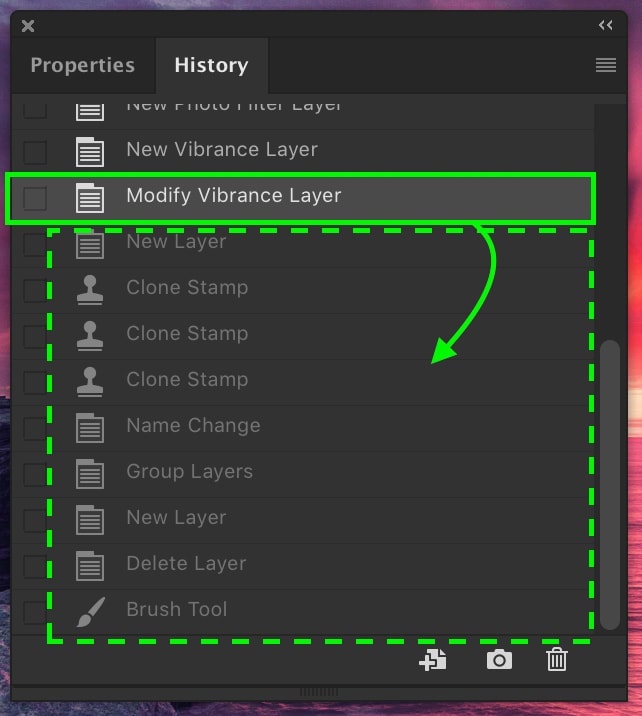
Photoshop has this nice undo panel where you can see individual edits and click your way to the desired point in history:
You’re usually autosaving. So it’s not every character, but maybe every minute and lots of other logical triggers like running the file. I’ve found it works very well.
In Atlassian Sourcetree you can stage the full current file, undo live changes in your editor, make different changes to your live document, and then reapply chunks of your prior changes from staging to live document (actually looks like undoing unstaged chunks).
When I write "foobar", delete the last three characters (so that now I have "foo", then I write a "t", I would like to be able to undo the previous deletion (giving me "footbar"), not just adding the last character.
Seems to me that would work especially well in editors that have the concept of verbs + objects, like vim's "delete until the end of the line" or "replace current word with...", but maybe it would work with all kinds of editors?
I’m kidding, but only a bit: the (in hindsight, reasonable) lesson of the Pijul paper[1] is that if you want to do the most general merge and (therefore) avoid any arbitrary choices, you’re forced to extend your model from consistent files as sequences to files potentially containing conflicts as DAGs (or something even more complicated if you have data more complex than a single flat sequence or edits other than insertions). Or you can very carefully make a consistent set of arbitrary choices, like implementations of operational transformation usually do.
    :earlier 3 – Undo the last 3 changes
    :earlier 5m – Go back to the state of the file 5 minutes ago
    :later 2 – After undoing something, redo the next 2 changes
    :later 1h – Travel forward through the change history 1 hour
Vim also stores the tree of changes, but it's a pain to access without plugins.
Another great Vim feature is persistent undo. You open a file, make modifications, save and close. You open again and the undo history is still there. You'll just have to enable that feature.. don't think it's on by default, unfortunately. Find a ~/.cache directory to store the undo history in.
This would make my life so much easier — constantly accidentally closing a file when I want to hold on to the undo history to redo something. Do you know the name of the feature/flag/setting?
    " https://vi.stackexchange.com/questions/6/how-can-i-use-the-undofile
    if !isdirectory($HOME."/.vim")
        call mkdir($HOME."/.vim", "", 0770)
    endif
    if !isdirectory($HOME."/.vim/undo-dir")
        call mkdir($HOME."/.vim/undo-dir", "", 0700)
    endif
    set undodir=~/.vim/undo-dir
    set undofile
That's neat, and a missing part of my vimrc - making sure the directories I use exist. Since I use .cache and exclude those from backups, it's actually bit me.
I've added this thanks to you:
call mkdir($HOME . "/.cache/vim/", "p", 0o700)
I think this avoids using the conditionals, by just using "p".
I think what vim has is different and better than what OP describes - it's two separate change logs, one for undo/redo and one for time-based jumping. Trying to fit both of those constructs into one list gets messy.
And even then, it was old news. There was behavioural research in the 70s, the same kind that was used for designing cockpits (and which saved lives), showing that modal interfaces were undesirable.
It can well be that you're a god with vim. But odds are, then, that you could have been a god with modern CUA-derived interfaces too (or with Emacs) if you'd put similar effort into it.
Supposedly this article has been mis-cited of late and the keyboard shortcuts / mouse shortcuts of yore are distinct from what we have today. I can't find recent links but I'll offer the general advice that words used in the 70s do not necessarily have the same connotations they carry today.
If I press ctrl-z ctrl-z, I expect the last 2 things typed to be undone. Based on what he's saying, the first ctrl-z undoes one step, and the second ctrl-z undoes the undo i.e. puts me back where I started, with no way to get back further.
Is there a special case for multiple undo's in a row? If so it seems unclear where to draw the line. If not it sounds nonfunctional.
In Emacs, undo makes an undo pointer go down in the undo stack. Pressing undo again goes back another step. If you do any other regular edit, the pointer starts over at the top of the undo stack. Undo puts its own edits on top of the stack like any other command.
So if you "undo, undo" you undo two things. If you "undo, edit, undo", you're keeping the first undo but reverse the edit. If you "undo, edit, undo, undo", you're back to where you started (except your undo stack has now grown).
Yeah for something that is supposedly intuitive this is the worst explanation I have ever read. I think what he's saying is that:
It works exactly like normal undo/redo, but if you make an edit that would normally wipe your "redo stack", then instead that redo stack is moved into the undo stack.
So:
  Type "hello"
  Type "world"
  Type "!"
  Undo
  Undo
  (Editor is "hello", with "world" and "!" on the redo stack)
  Type "dave"
  (This would normally wipe the redo stack but instead it moves it to the undo stack)
  Undo
  (Editor is "hello")
  Undo
  (Editor is "helloworld")
  Undo
  (Editor is "helloworld!")
  Undo
  (Editor is "helloworld")
  Undo
  (Editor is "hello")
I like the idea. It's a little weird that typing changes the undo stack but it already can change the redo stack so I don't think it matters.
It needs an understandable explanation and ideally a web demo to gain traction though.
I think the best strategy to make it intuitive would be to flatten the redo stack as a single command, so that the pile of successive 'undo's gets redone as a single step. In your example:
  Type "hello"
  Type "world"
  Type "!"
  Undo
  Undo
  (Editor is "hello", with "world!" on the redo stack)

  Type "dave"
  (Editor is "hellodave")
  (This would normally wipe the redo stack but instead it moves it to the undo stack)

  Undo
  (Editor is "hello")
  Undo
  (Editor is "helloworld!")
  Undo
  (Editor is "helloworld")
  Undo
  (Editor is "hello")
I get what you are saying, but I think it is confusing to refer to a 'redo' stack at all. There is only ever one stack, and you are always at the end of it. To go back through time you copy the states onto the stack (stack isn't even the right word, I guess but I'll stick with it)
Consider typing the alphabet
Stack:
  1.a
  2.ab
  3.abc
  4.abcd
Now you 'undo' back to place 2 and type 'x'. But while you are conceptually travelling back in time, what the stack really looks like now is:
  1.a
  2.ab
  3.abc
  4.abcd
  5.abc
  6.ab
  7.abx
A conventional undo stack would leave you stuck at a new place 3: abx, all redos gone. Undos from that point can only take you back to place 1 or 0. (Just tested this out on OS X TextEdit, it does this). With the linear stack, there is no redo, only undo.
I think that is what the article means at least...
Photoshop has nonlinear history. When this option is tunred on, you can undo several times, make a change, and not lose all the states you've undid - isn't this what he's talking about?
> If so it seems unclear where to draw the line. If not it sounds nonfunctional.
There is no line. It is just one long linear list. An undo operation is an edit to the text after all. So the edit made by the undo operation also goes as a text edit operation in the undo list.
This is the way undo has always been in Emacs. I wouldn't say it is nonfunctional. I use this in Emacs undo, redo (which is undo-of-undo) and it feels okay most of the time. It is good to know that Emacs will never lose any edit even if I have performed a confusing series of undos and redos. But it can get confusing pretty soon if we are undoing and redoing on the same edit too many times.
That is why many people don't like linear undo history and install an undo-tree plugin which makes undos easy to navigate in a tree. Yet another reason to design some computer/software history lessons so that devs can learn from the existing techniques, their adoption, benefits and complaints.
Interesting. So basically the last chain of undo doesn't enter the history until you do something else.
I often use undo as a faster delete when making edits, so I think I would still be annoyed by this (why am I seeing this crap I undid reappearing?) Now after a long undo chain I'm afraid to type for a new reason: it will pollute my undo stack. But it might be reasonable if my brain was used to it. Can't knock something I've never tried.
Note that if you delete something and press Undo, it restores the content that was there before removing it.
The "branching undo" in the article extends the concept to being able to recover things that were at some point in your "redo" pile, but which in other editors would been have lost when you typed something else while in that state.
As the article explains, the simplest mental model is "rewind in time to the point I was 5 minutes, 10, 15, 20 minutes in the past". If you've been undoing and redoing things, going through that point in the past will retrieve those removals and retrievals.
Like the GP, I also use undo as a faster delete. The key is that undo in Emacs doesn't just go one keystroke at a time. By default it will basically quash a whole chunk of similar operations and undo/redo them together:
> amalgamating-undo-limit is a variable defined in ‘simple.el’.
> Its value is 20
> The maximum number of changes to possibly amalgamate when undoing changes. The ‘undo’ command will normally consider "similar" changes (like inserting characters) to be part of the same change. This is called "amalgamating" the changes. This variable says what the maximum number of changes considered is when amalgamating. A value of 1 means that nothing is amalgamated.
There's also a hidden 10s idle timer that will insert a boundary to break up the amalgamation. So if you type, pause and think, and then start typing again, the chunked undo/redo will always stop at the point that you started typing again. Taken together, it's usually quite effective at guessing how much to delete.
The act of undoing need only become part of our linear history if we squash the proverbial butterfly and thus alter "the past"; in that case the act of undoing itself is instantly recorded as a series of changes, by replaying the redo stack onto the undo stack twice: 1) Forwards, for the original changes 2) and then backwards, to record the history of our undoing.
By squash the proverbial butterfly and thus alter "the past" they mean make an edit after undoing.
No, Ctrl-Z Ctrl-Z still undoes the last two edits.
Basically Ctrl-Z is now "rewind" and Ctrl-Y is now "fast forward". Instead of a stack you have an append-only list. Even Ctrl-Z appends to the list. (I'm eliding the optimizations he mentions.) So if you Ctrl-Z then edit, you can still get back to the state before your Ctrl-Z.
That's it. You can think of an undo operation U at time (t) as a new simple command that rolls back the content to a previous version (t-x). If you undo that U operation, it's a new command U' that restores content again to version (t).
The history sequence would then be:
(t) --U-> (t-x) --U'-> (t)
And if you add (A) some new content (c) when in state (t-x), it becomes command , which can itself be undone with commands U'' (to remove A), U''' (to remove U):
That means silently killing off potentially large amounts of editing history every time you edit after an undo. That's the problem this article is about.
I was thinking maybe you ignore it for the first 10 seconds or even better until the cursor changes to a new position, thqt way quick rewinds work in the moment. But later on you can restore the state with undos factored in.
This is exactly how undo works in Emacs out of the box. Personally, I prefer to install the undo-tree package and manually browse through the tree of undo paths. I'm not sure why this author finds a tree unacceptable for this purpose.
Additionally, emacs will filter undo/redo’s to changes within a region. If you select a region (no new command to learn) and use undo/redo, it will only perform those that affect text completely within the region. This is a superpower that delights me each time use it.
That region based undo is fantastic and has saved my bacon so many times! I really wish more apps had it, though I shudder to think of the implementation complexity.
Yes! Having regional undo is super useful sometimes. I switched from emacs to vim a long time ago, but still miss this feature (although not enough to go searching to find an equivalent vim plug in I guess). Lazy web?
Well if you want to return to Emacs, I can attest as a former long-time vim user that the emulation layers for vim modes in Emacs are fantastic! They're really the only good part of vim, as the configuration language was always a bit less desirable than elisp, imo.
I've tried in past but always found the vim modes to be a bit lacking. My last attempt was probably 6 or 7 years ago though so maybe worth another shot!
There is a very opinionated and batteries-included "Vim-y" Emacs called Doom [0]. A decent way to approach this if you don't want to start writing elisp outta the gate to have fancy editor features is to learn enough of the Doom config to tweak it to your liking, then add some elisp customization in as needed. I personally use this approach, usually cribbing config and elisp tweaks from the top contributors' configs.
The Evil layer that Doom and most everyone seems to use for Vim modes works really well, and has a lot of ways to tweak things (e.g. changing `j` to `gj` for going through line breaks in normal mode; I forgot what that setting is called...).
There is something to be said by bootstrapping your config entirely from scratch instead of using a "config framework" like Doom, but that can be too daunting and end up preventing one from trying things out.
I ported my vim configuration to Evil Mode seven years ago and haven’t looked back. Evil Mode is the best done vi emulation layer I’ve seen and I think it even improves on vim in at least one area (the behavior of `I` in visual line mode).
Yeah, I spent a long while (years) using pretty much exactly the solution he describes, as implemented in emacs. It's not as good as a tree, because undo/redo cycles make it very annoying to traverse through the history. I greatly prefer undo-tree.
You can, if you like, install the 'vundo' package, which gives you a tree-based overview of your undo history, making it easy to switch between branches and go backward and forward. It's basically like the undo-tree view for the default undo mechanism.
Two suggestions that might make it easier for you. There's a package called `undo-fu` that puts a thin layer on top of the undo system to keep the behavior strictly linear.
And built in, there are the `undo-only` and `undo-redo` commands. Unlike the base `undo` they will only walk in one direction.
I'm not sure how you deduced that I'm actually a vi user, but it's interesting to see that vim has similar support but using separate linear undo and redo commands g- and g+ . undo-persistance and undofile seem to be orthogonal to that though, I'm even less sure why you're bringing that up.
Sounds like this solution would best be implemented with an undo-tree, but also a linear history mapping with pointers to that tree - the linear history would just log movement within the tree over time e.g. undo-redo would just be a backwards-forwards movement.
That's exactly what you get with undo-tree. The regular undo/redo commands continue working as normal, but you can also manually browse the tree if things get too nonlinear for you.
Make sure to check the value of `undo-limit`, as the low default value greatly (and needlessly, on modern machines) nerfs undo. It also applies to extensions like undo-tree and vundo I believe.
> undo-limit is a variable defined in ‘C source code’.
> Its value is 10000000
> Original value was 160000
Speaking of extensions, I find undo-tree pretty buggy. I might be one of a dozen people who actually love the default undo/redo mechanism.
No, he says most people do not actually implement the interface to make it make sense. So they have to make ctrl-z and ctrl-shift-z do the logical linear thing which requires all sorts of craziness which is what is complicated to do correctly (e.g. without breaking user expectations).
I confess I didn't get that the post was about emacs. Reading the intro, it sounds more like it assumes nobody ever implemented something. And then goes on to describe what sounds a lot like how emacs works.
I implemented something similar for a interactive whiteboard project once. The undo operation would simply be appended as another action that itself could be undone by re-doing it.
However, as you played with it, it became confusing because it ran counter to ingrained expected behavior of an undo/redo dual stack implementation. Eventually I implemented the classic approach.
There's an interesting parallel here: the system proposed in the post is concatenative, and the undo tree style is, well, a tree. Sort of a Forth v. Lisp thing.
Here the big disadvantage of Forth, the implicit stack state, is less obviously balanced by something good. The UX of undo trees could certainly use improvement, it would be great if undo/redo behaved as expected, but any pivot point would automatically pop up the tree view. Then there's cherry-picking, but I have a solution to that.
This is in fact the thing I want most from an editor: select a region and then undo/redo changes only in that region. Search and replace tends to work this way, but I've never seen it in an undo/redo system.
How many times have you modified a function, broke it accidentally, and just didn't notice and made more changes? So the tests go red, you run a diff, and you see exactly what needs fixing: but you copy and paste out of the diff, because you can't just undo within the offending function.
As another comment mentioned, this is exactly how Emacs handles undo, so this is not revolutionary.
Two important things to point out about this approach:
1. you will never lose any previous information (barring memory limitations). You can be confident any previous state can be retrieved somewhere along the linearized history, and you don't need to search along a potentially thousand branched tree. Just follow the linear history and you will find it.
2. this tracks the chronological state of the buffer. For some reason, people do seem to get confused with Emacs's undo functionality because they're familiar with the "Microsoft Word" style undo, but I feel like it's intuitive if you think of it as a literal timeline of the buffer state. If you want the state of the buffer five minutes ago, you will need to undo past the one minute ago state, the two minutes ago state, etc. And then two minutes later, you can undo two minutes back to get the same state again even though the "original" state is now seven minutes ago, because when you "undid" you brought the buffer back to that state in the present.
Semi-related: What I really wish all my editors and IDEs would have is some kind of "delete history" view into my deleted text (especially blocks of text).
I'll often delete something, then work for a while, then realize I need that thing back again so I have to VERY carefully undo everything after the delete until I get to a point in history before it, copy the deleted text, then re-do everything back to my original state while making sure not to accidentally execute any inputs which would burn down the redo stack.
Just a list of tools that have this, in case you use any of them and didn’t know: Vim - has this with undo tree Emacs - has this as well Jetbrains - IDE’s have this with local history they show changes made. VScode has this I’m pretty sure by default otherwise there’s a plug-in for it since I remember doing it.
Also just want to add something really cool about vim and undo/redos that relates to this post. With vim your able to “block” or “bunch” your changes which allows you to control what an undo will do. For example, going into insert mode and typing a sentence than exiting insert mode would be one “bunch” and undo would undo that entire sentence. If you wanted to you can control it by leaving insert mode after a adding a single word or making a single edit and that will be what the undo will revert. Probably rambling a bit here, but the concept of controlling what will be undone/redone is a really neat feature of vim.
Jetbrains IDEs can do this using the local history feature. Browse through time on a separate tab, copy what you need, and paste it back into the present.
Whats even more amazing is that you can right click the package/folder and get local history and see entire files that you previously deleted.
Took me a while to discover this but has saved me almost as many times as local history in a file. Also makes me feel much better when refactoring and deleting tons of old code.
A lot of IDEs (I know Eclipse and VSCode both do this) will create a copy of the file you're working on each time you hit save. You can then navigate back through the local history of the file.
I'm conditioned to hit Ctrl+S with almost every change, so this gives me a very detailed history of my revisions.
You can use “cut” instead of “delete” and clipboard with history tracking, for example Alfred on macOS.
Then you cut, do some changes, and later on realize you wanted something from the cut code, bring out the clipboard history and fish out what you need.
Emacs does this by default. Anything you delete ends up in the "kill ring", and you can cycle through that when pasting ("yanking") something. Packages like Consult[1] provide version of the yank-pop command that, instead of cycling through the kill ring, make it searchable.
Yes, but having thousands of snippets in a bucket can be quite confusing too, where do the pieces go back and so on.
For this reason I comment out code then keep it until I’m sure I no longer need it. This works in sessions, and do the final delete, clean up etc at the end of the session before committing the changes to the repo. I see devs keeping commented out code in repos but that adds too much noise, makes the code a real mess..
Yes, vim’s “set undofile” will create a persistent undo file that stores all changes to the file indefinitely. You can undo changes made months ago over reboots. If you move the undo file between machines, you can undo on different computers.
Undoing a change from 2 hours ago in the same editing session is the trivial use case for undofile.
My biggest gripe with undo is in cases where it's unclear what undo will do if anything, and the action is file or email related without a clean redo option.
Thunderbird - oops I just keymashed and did a bunch of random shortcuts. OK great I can Undo infinitely with no indication of what emails are being moved or undeleted, etc.
Windows Explorer, Dolphin etc - undo can be pretty opaque unless you already know what it is that is being undone. And there isn't a redo!
> Of course that tree requires a navigation system for users to pick their way back through the undo-redo history, leading to all sorts of complicated user interfacery that nobody has time to deal with.
I would LOVE the complicated user interfacery to be in all applications to show at least the list of actions! Image editors are great at this.
The best form of history, undo and redo I've used is on hte various Jetbrains editors. It's a feature called Local History and is insanely useful.
1. It's always on. It never requires an explicit save or commit;
2. It automatically saves any changes and timestamps them;
3. You can view the state of a file or a tree at any moment in time and then pull out that file (or tree).
4. If you do that, it becomes part of the temporal history so you can always go back.
I find this completely natural because usually when it's necessary you think "Oh I need to unwind most of what I did in the last hour" or "I changed something I shouldn't have yesterday". You're not thinking about a line (or a tree) of changes. You're thinking about times and possibly ordering ("I changed X right before I changed Y").
Local History is hidden in the File Menu and does not have a shortcut. It is one of the most useful features in the Jetbrains editors, so I set Alt+Z as a keyboard shortcut (because Ctrl+Z is undo), which after a few years of using it still seems like a good idea.
One point that is missing from your description is that it always shows the previous state in the diff view, which also feels really natural to use (I only sometimes whish the diff markers were more distinguishable from the inspection and ToDo markers).
Yep, I use Apple Time Machine for much the same purpose. Once you've set it up, it's always on, you can just go back in time (the granularity is once per hour, but that's been enough every time I've needed to use it) and restore (or make a copy of) any file or folder. Saved me quite a few times when Git has let me down.
I wish VS Code would expand on that feature, coming from IntelliJ. It's really annoying that you need to type the name of the file you want to see the local history of, even when it's the currently active file in the editor. There should be a sidebar widget for it that's active for whatever the current file is.
The cool thing with IntelliJ is if you accidentally deleted a file you can just touch a blank version of the file and the history comes back. Not sure if VS Code does that yet.
There is a sidebar widget. But it starts merged in the File Explorer view, and you need to drag it over from there to the sidebar to make it independent - https://stackoverflow.com/a/71522634
The widget is called "Timeline".
> The cool thing with IntelliJ is if you accidentally deleted a file you can just touch a blank version of the file and the history comes back. Not sure if VS Code does that yet.
VS Code does keep the history after file deletion, but I'm not sure how to access it from inside.
I had to manually rummage through the storage directory to find a file I accidentally deleted, but it was an file which was never saved (think Untitled), so it didn't had a path that I could try creating a blank file at.
I think it's a fairly common situation that people using programming tools (VS Code, git, vim etc) can go for years without realizing there is a built-in feature that can solve exactly a problem they always struggled to solve. I'm not sure how to surface that sort of functionality in the tool, but I'm glad HN is here to point it out. One similarly cool thing I learned in a recent comment is that if you press dot (.) on Github web interface, it will launch an in-browser VS Code instance to edit the file you are viewing. Nifty!
You are a faster reader than me. The October update has around 4,700 words plus plenty of images to digest. I understand you likely mean to review the highlights, but a non-trivial amount of information is in each months update. And if you haven't been keeping up for the past 6 years, it isn't easy to catch up now. Not to mention the breadth of the marketplace.
On the implementation side, I think the article implies that you might need to model the edits by Operation, rather than State? Otherwise, the cost of the undo scales O(N) of the content size, which is not viable.
It works well for Git, which models content by State, using Structural Sharing. But Git has built-in delta compression so the memory footprint is roughly O(1) per operation. I don't think implementing this on the web for a <textarea>, or [contenteditable="true"] is a "minimum" effort.
Challenges I can think of:
1. DOM api exposes state, not operations. You need manual diffing
2. When applying the operations, you need to manually restore cursor positions
3. CJK language IME might inject unwanted intermediate states that must be ignored
Google's internal source repository client CitC (client in the cloud) behaves this way for your entire workspace, forever.
It was so freeing - every single file save, delete, move and so on was saved without user intervention.
Realize that you were barking up the wrong tree for 2 days? Simply go into .snapshots and the entire workspace from before would be there.
This interface composed so well with other tools you could do a parallel bisection test across every prior state of your workspace and find the minute where you made an edit that broke some functionality. All on the cloud.
I miss this tool very much. No amount of git commit discipline can emulate it.
Honestly IMO it's a bit better--often times I find myself wanting neither _this_ nor _that_, but some of each. I get to a point in a function where I realize changes I made elsewhere are no longer needed, but I want to keep my function the same. So I usually just copy the function (and paste it someplace so I don't for real lose it), undo everything, then just splice the function back in how I want it.
This sounds very similar to Emacs' undo history, except Emacs doesn't implement the "window shopping" optimisation. Instead, Emacs has a command `undo-only` which is similar to `undo` except it will skip over undo-redo chains.
> Thus you can use up all available memory in approx. 64 quick steps by: ...
I disagree. If the editor uses a very basic implementation, then "Undo to beginning" would probably require the user to perform multiple undo steps, in which case the memory usage would be linear in the number of steps rather than exponential. If the editor supports "Undo to beginning" as a single operation, then it would be reasonable to expect a more sophisticated implementation that does it efficiently -- memory usage can be reduced by sharing the repeated sections of the undo/redo stacks, and it is possible to efficiently skip over undo-redo sequences by recording which states are identical. Exponential memory usage would be indicative of a lazy programmer rather than a fundamental issue with the GRUQ-orithm :)
This doesn't solve the problem of wanting to redo from another "do history branch" while preserving the changes you've done in your current history branch. Using the notation of the article, you have done:
A -> B -> C -> rewound to B -> D -> E
Now at that E point, you'd want to have C too. (I'm assumikng there is no conflict between C and E.) There is no point in the linear history where you have both E and C. Sure you can go back to C, or go back to E. Or go back to C then decide to go back to E again. But you can't have both.
In vim, I use the fact that the yank buffers are not part of the undo/redo history, only changes to the file are. So I undo to the point I had the change I want back, yank them in a named buffer, redo and put the yanked buffer. You cannot go to an alternate history, but at least you can get back stuff you've deleted.
In git, what I describe is pretty-close to cherry-pick from a commit in a branch you deleted that you find using the ref-log.
Emacs already implements exactly what they are proposing: an undo operation is just another action added to the chain of states, which can itself be undone.
I disagree that undo and redo are the only two actions needed to support this behavior. For example, if I’m performing the following three actions:
- insert A
- insert B
- insert C
And then I undo, I would expect to be be back at having AB. If I then undo, I would be undoing my undo and have ABC. Then undoing again would get me back to AB. And I remain in this 2-cycle.
Instead I propose the best solution is to be able to “step out” of the editing experience and see your history in a separate UI, and be able to choose a specific past version to revert to. This revert would be an atomic operation that could then be undone.
This is how most versioned consumer systems I know of work today (e.g. Google Docs, Figma, MS Office) and it feels intuitive to me as a user.
You can do this with a tree-based persistent/functional data-structure, too.
For instance the single writer (per resource) in the evolutionary, append-only database system[1], I'm working on in my spare time, can simply revert the whole resource (resource is like a table in the relational DB jargon) to a past revision. Once a new commit is issued a new revision gets appended and the whole history in-between is preserved. Thus, you can, for instance, retrieve individual changes and cherry pick these from the revisions in-between.
Cool! What about a model based completely on the "history" as a list of states of the document over time?
There is no "undo" or "redo" operation, we only have "browse backward/forward in time".
If you are browsing at a point in the past history, you can just start editing. Then the document state is copied to the end of the history (i.e. the current point in time), followed by your edits, etc.
This removes the 2^n problem. It could be a bit inconvenient if you want to do a lot of tree-like changes, but could also better balance convenience+usability+power.
That is basically the same as the proposed skipping of B in navigation. It does however require the ability to put "make document look like X" (where X is the old state) as a single undo stack entry. If your app design allows that, great, squashing all of B into a single entry would work fine.
Such an implementation would be: if you go back and try to make a change, it moves everything from the redo stack to the undo stack (to return the the "present"), adds one entry in that represents atomically changing the document to match the old state you were looking at, and then finally adds the change you attempted to make as a new entry in the undo stack.
Hmm, I wasn’t thinking of implementing it as an undo stack at all. Anyway, the main difference I’m thinking of is UI and mental model we present, which I think could be a lot simpler here.
This reminds me of the time I nuked all my code by mistake (rm -rf *) and I still had PyCharm open, and I opened their "Code History" tool and un-deleted all my code, immediately proceeded to commit and push whatever state it was in because I was about to freak out.
I think all IDE's should have their own internal copies of code that are housed elsewhere, it has saved me hours of turmoil trying to re-write already solved for code.
1. visual undo/redo. I don’t want to be surprised when I perform either command. Show me.
2. visual clipboard with history. I don’t want to be surprised when I paste something. Show me. Also let me have more than one item in the clipboard.
Now I know some of you veterans will say, “there’s a plug-in for this! You just need to do these things…” no no no. I want this mainstream. Why are we living in the 1900s still?!
> 1. visual undo/redo. I don’t want to be surprised when I perform either command. Show me.
I'm having a hard time imagining an implementation of this feature that would be faster than "undo, check what happened, redo if undesired". I can see a need to explore the whole history (JetBrains IDEs have the local history), but what benefit do you see from previewing a single step?
> 2. visual clipboard with history. I don’t want to be surprised when I paste something. Show me. Also let me have more than one item in the clipboard.
CopyQ is a great tool that does just this, available on Linux and Windows. I'm sure there's an equivalent for Mac.
EDIT: also, not to plug JetBrains again, but their IDEs have clipboard history built in within the editor. I have CopyQ for system-wide clipboard history, so I don't bother with it, but it's there.
Hmm, interesting, but I would actually like a different system (and let me know if any VSCode plugins implement this!): I want TWO forms of undo, one which actually undoes my changes, and one which only shows me a ephemeral view of the code in previous states. Call it "not really undo" or "viewing history but not changing it".
In this methodology, without exposing the tree, how does the user select between the two branches created after the butterfly is squashed?
It seems like Google Docs does it in an intuitive way where undo / redo works normally, but there’s another time ordered history of the document to select from.
In the author’s algorithm there is no two branches. The following diagram is an undo tree where we made change B, went back to A, then made C
      C ——— now
     /
 —— A
     \
      B
But time doesn’t branch, so our history shouldn’t /have to/ branch. What if our undo was itself part of the linear history? Then we could build up the history like this:
  A
  A —— B
  A —— B —- undo_B
  A —— B —— undo_B —— C
For complex undo/redo scenarios this could get out of hand.
A — B — undo_B — C — undo_C — undo_undo_B —undo_B — undo_A…
But the author (I think correctly) states that for the average user this behavior is intuitive and desired.
They also added the optimization that undoing and then redoing a set of changes doesn’t make it into the history, as it’s basically a no-op.
Nope, the author's solution is to consider the original undo (the "time travelling") to be an undo-able change in itself. No branching history. So you end up with:
  state 1
   * change A
  state 2
   * change B
  state 3
   * undo B
  state 2
   * change C (the "butterfly squashing")
  state 3a
   * undo C
  state 2
   * undo <undo B>
  state 3 (!)
   * undo B
  state 2
   * undo A
  state 1
The traditional editor would differ by putting you right at state 1 at (!), blocking your access to state 3.
many editors collapse edits into a groups and you can only undo by groups, not individual keypresses. This is usually desirable. For example type X then cursor right 60 times then type Y then undo 3 times. Are you at 2 characters before where the Y was or back at the X or before the X? In other words, were the 60 cursor right keypresses collapsed into 1, 2 steps or not collapsed at all
Good editors spend some time thinking about the most expected group definitions, bad editors (vscode in this specific case) seem to have picked a random number for their group size or a even a fixed number of keypresses but it feels random. There's no predicting how much it's going to undo in a single Ctrl/Cmd-z. Ii rarely does what I want compared to other editors
I haven't seen `set undofile` mentioned yet- vim supports persistent undo. You can close a buffer, restart etc and when you reopen, you can still undo. I'm a huge fan.
> you can use up all available memory in approx. 64 quick steps by: Type 1 character; Undo to beginning; Type 1 character; Undo to beginning; etc
This is fine because "undo to beginning" isn't a single action. Each time this loop runs, the user spends more and more time mashing undo to get back to the beginning. The number of actions in the history is only increasing by a constant amount per user action.
This happens to me frequently both in code editing and designing in Adobe suite, needing some of the redo changes after a series of undos. I usually just cut/copy the the parts i want to keep before doing the undos to get to a previous state and paste them back in. Works pretty well.
Lifestreams was based on the same core idea of keeping all past versions of a thing. Only with Lifestreams you keep all past versions of everything. I constantly find myself thinking back on these ideas from the 90s, there's a lot in Eric Freeman and David Gelernter's work that is worth revisiting now that storage is so cheap.
I absolutely detest emacs' default undo behavior. I find it worse and more confusing than the normal simple stupid algorithm. With undo-tree, it becomes better than normal, but only very marginally so. I use the linear undo and redo it provides every day but only go looking at the tree a few times a year.
Plug for the Vim undotree plugin, which exposes Vim’s undo tree in a navigable UI. It’s saved my butt in the rare occasion I need it. https://github.com/mbbill/undotree
>The second of two interactive music videos on Canter Technology's Meet MediaBand CD-ROM, UnDo Me could very well be considered the "Choose Your Own Adventure" of music videos - in that MediaBand's lead singer, Kelly Gabriel, has to choose from one of four different relationships. YOU help Kelly decide which one to try, and navigate her way through each relationship.
>At the end of each chorus, you are asked to make a branching decision based on whether Kelly should be passive (ice) or aggressive (fire) with the guy she's going out with. Things not turning out well for her? At any time you could "UnDo the past" and choose a different guy, or even jump back to a certain point in the relationship and change your decisions.
>Four separate videos were produced for each relationship (concluding in a total of 16 possible outcomes), connected together with an intro, a home chorus and reverse/"UnDoing" sections. As you could probably tell each section has a different musical style, reflecting the mood and personalities of the relationship that section represents. A version of the song can also be found as a separate CD audio track on the Meet MediaBand CD-ROM.
Wll, it's a tree that is collapsed into an array - which makes it an array to all intents and purposes.
The point is that the "tree-ness" is never exposed to the user. This is the problem OP is claiming to have solved - the cognitive burden that the tree solution introduces.
So, like Google Doc's document history? When you revert to an old version, it creates a new version with the old contents, it doesn't delete all the intermediate states. (although ctrl-z ctrl-y doesn't do this)
This is not like Braid at all, since the game works by "overwriting" your past actions (with a few other mechanics).
The Braid editor would be like "Normal" undo except a ghost cursor continues to make the edits you just undid. Would be a hilarious April fool's feature.
Intellij enables multifile changes, renames, file moves with multiple files as single operation, as well as reload from disk, which breaks this simple linear history model afaiu. There is also a separate linear time-based local history in case you screw up. How intellij handles this is the best, in my mind, because of simplicity and separate "I screwed up" mode.
"Local history" in IntelliJ has saved me several times. The diff mode is very useful when working on a piece of code and suddenly your tests starts failing and you need to find out what changes you made in the last hour.
> No, there is no undo "tree", nor any complicated graphical user interface to go with. ... You've got your undos, your redos, and that's it. The underlying data structure is strictly linear, but all edit states are preserved and reachable ...
This is exactly how Emacs works!
Emacs has worked like this since its beginning in 1980s. It was even documented in the first manual (1981):
This might seem to pile one disaster on another, but it doesn't, because vou can always Undo the Undo if it didn’t help. (page 137 of manual)
I think there needs to be some sort of computing and software history lessons. It can offer great value in the current world of software development. It will save you from the trouble of rediscovering techniques that are already in use in classic battle-tested software.
(And really? You need to invent a cheesy acronym for this? If that's what it takes to sell the obvious these days, how about SLUR - Simple Linear Undo Redo?)
Kakoune, like the more logical Vim it is, has both in a sensible arrangement: an undo tree with a current branch, which you can navigate up and down (u/U), and a linear history of the path you took through that tree, which you can navigate backwards and forwards (<a-u>/<a-U>). Unlike a single undo branch, you’re never afraid you’re going to lose your work when you need to go rescue a piece from a previous version; unlike a plain linear history like TFA proposes and Emacs uses, you’re not punished with a quadratic number of undo/redo pairs if you need a point behind several parallel do-overs of the same part. Unfortunately, without any sort of visible representation of all that I frequently find myself getting lost in the whole thing.
(Now that I’m thinking about it, Git’s commit tree and reflog play a similar pair of complementary roles locally.)
It's more of an implementation detail that is available to users. The article's simplification is also available via :earlier and :later, with the added bonus that they can take _time_ as a parameter as well as a simple revision count. “:earlier 1h” has been handy more than once.
In Anathem there were academics who spent their entire lives learning the history of academic scholarship for the express purpose of reminding everyone how often things are reinvented and preventing people from getting too excited when they have discovered something that was already known. I’m drawing a blank on their name, but it was one of the things about the book that I really enjoyed. It really helped to sell the setting, where the scientific method has been known and used continuously for 5,000 years or more.
I found the article interesting because it's an approach that I could apply to tools other than text editors - it explains the general concept. I wouldn't have discovered it if someone just posted a link to a Vim add-on.
Or the earlier / later commands which function exactly as the article describes and are part of vanilla vim. You can even give them a time argument, for example :earlier 10m to go back ten minutes.


Usually the whole reason I might undo for a while is to get back part of something I was working on and merge it into other changes I’ve made since then. I’m curious why the author dismisses this, personally cherry picking old history is my primary workflow with undo. In editors that support the undo history they’re advocating here, like emacs, I’m usually undoing a long way so that I can put something in the clipboard, then redo all the way back and cut-and-paste the previous partial state.
It is nice in emacs that typing after undo doesn’t lose my undone edits, that is handy and is a nice little safety net, but it doesn’t actually solve the problem I normally want to solve.